
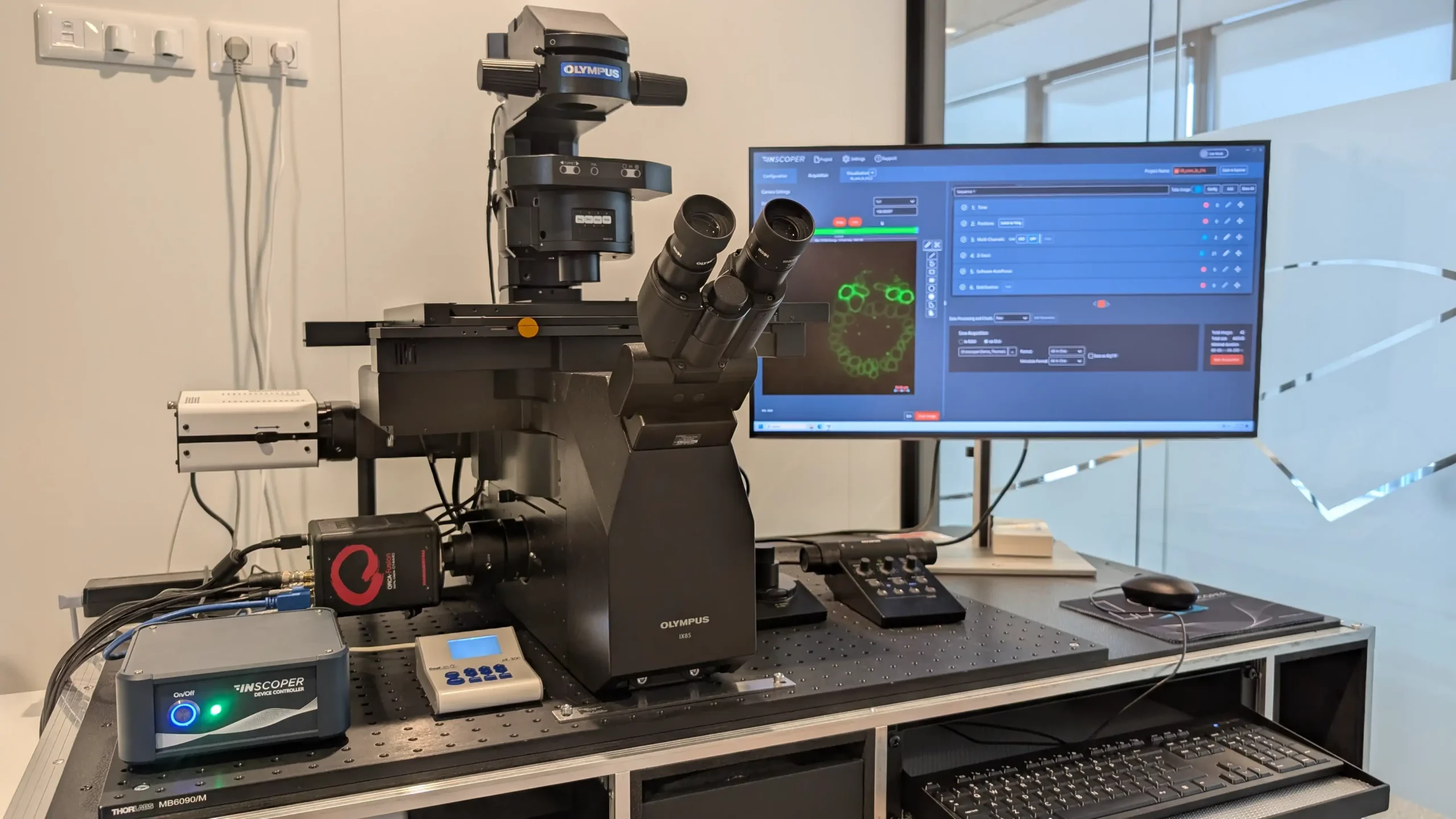
Imaging Software for Microscope Automation & Smart Acquisition
Interface & Features
INSCOPER Imaging Solution (I.S.) brings a single, intuitive interface together with a robust control architecture so you can design, run, and repeat microscopy workflows—from simple time-lapse to advanced, feedback-driven experiments. At its core, I.S. separates device control (handled by a dedicated Device Controller) from the user interface, improving reliability and timing while keeping your workflow simple.
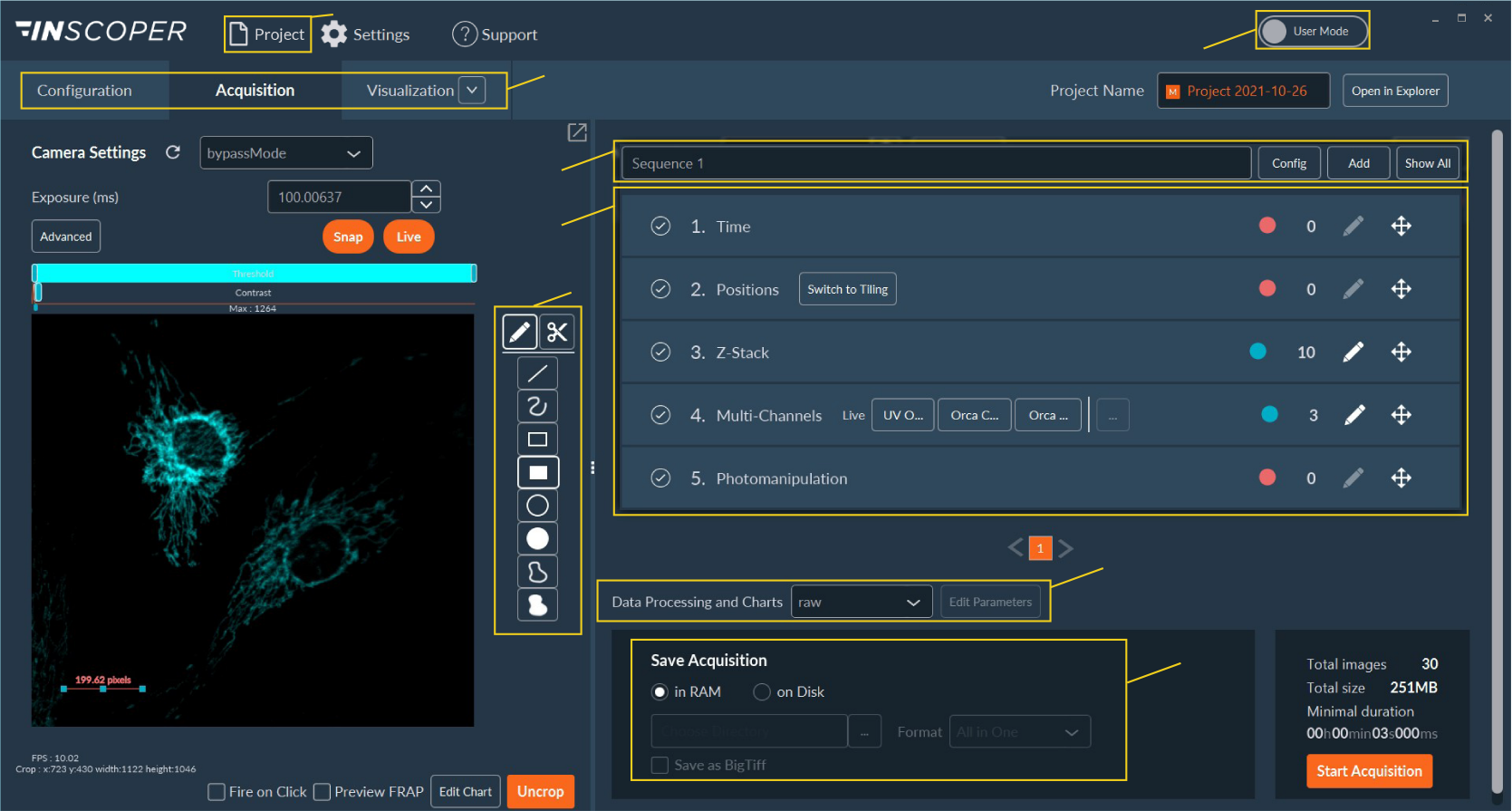
A unified, intuitive user interface
One window, three tabs
Navigate the full imaging journey across Configuration, Acquisition, and Visualization—with live camera viewing always available.
Project-centric workflow
Organize experiments with built-in project management, choose User/Expert modes to tailor access, and keep settings consistent across sessions.
Drag-and-drop acquisition builder
Define the order of dimensions (time, positions, Z-stacks, multi-channels, photomanipulation, etc.) and manage sequences visually. Save data as TIFF/BigTIFF and access ROI and data-processing tools directly in the window.
Intuitive software environment for all microscope users
See it at YOUR microscope
Get a quick compatibility check and a tailored workflow walkthrough.
From simple to advanced experiments
I.S. scales with your system complexity and application needs:
-
1D Imaging: Camera-only control (e.g., live imaging, time-lapse).
-
3D Imaging: Motorized microscope control without XY stage—ideal for multicolor, Z-stack, and time-lapse.
-
5D Imaging: Add XY stage control for multi-position, multi-color, and Z-stack experiments.
-
High-End: Laser-based techniques like photomanipulation, TIRF, or optical sectioning.
-
Home-Built: Customized setups for novel techniques and calibrations.
Under the hood, the Imaging Solution bundles InBox + API + Configurator + Inscoper Software for a ready-to-use, end-to-end control stack.
Application highlights
Design your workflow in minutes and grow it as your science evolves:
-
Timelapse, multicolor & Z-stack foundations you can combine freely.
-
Ratiometric imaging, lifetime microscopy (FLIM), and photomanipulation for more advanced readouts.
-
Microfluidic control and continuous-motion/mosaic imaging when your biology or throughput requires it.
Key features (selection)
-
Configuration: Access microscope & third-party settings; manage camera presets; auto-save and recall parameters; guided user mode; ROI creation; channel management; assisted hardware setup and calibration.
-
Acquisition: Drag-and-drop dimension ordering; multi-sequence acquisition; repeat loops; raw and processed data capture; shading correction; real-time visualization and charting; conditional ROI creation.
-
Visualization & Data: Save as TIFF/BigTIFF; export images/graphics/video; replay datasets by dimension; automatic centering; global project visualization; expert access to create new algorithms.
Why labs choose INSCOPER
-
Do more, faster—independently. Build, modify, and reliably reproduce imaging workflows regardless of your microscope expertise.
-
Go beyond conventional software. Replace or augment legacy tools (e.g., MetaMorph, vendor packages) with a modern, ergonomic workflow engine.
-
Stable by design. A dedicated control box (InBox) reduces OS-related issues, lowers latency, and improves synchronization—more robust than running everything in Windows alone.
-
Open and extensible. Scripted/AI-assisted workflows, event-driven acquisition, external software calls, and a broad device library—plus rapid integration of new hardware.
Streamlined User Interface
Experience a seamless workflow with our intuitive, single-window interface that simplifies complex microscopy tasks.
Enhanced Temporal Performance
Achieve precise and repeatable results with our dedicated InBox that minimizes latency and synchronizes device control.
Comprehensive Compatibility
Our solution supports various file formats and integrates smoothly with your preferred analysis tools.
Flexible Workflow Management
Customize and manage your microscopy sequences effortlessly with our adaptable workflow tools.
Advanced Data Processing
Analyze and process your data directly within the acquisition screen, ensuring efficient and accurate results.
Robust Storage Solutions
Store your images in .tiff or .BigTIFF formats, providing flexibility for large and complex acquisitions.
INSCOPER Imaging Solution
Intuitive single-window UI with a dedicated control box (InBox) to design, run, and repeat microscopy workflows—from simple time-lapse to advanced, feedback-driven experiments.
- Single-window UX
- Project-centric workflow
- Drag-and-drop sequencing
- Core-facility ready
Flexible by design, with a clear stability roadmap
INSCOPER’s strength is broad device integration and workflow flexibility. We’re transparent that, in edge configurations, this flexibility can trade off against absolute stability. Our stabilization plan focuses on tighter versioning discipline, metadata normalization, targeted regression tests around configuration deltas, and clearer rollback/backup paths.
- Versioning policy: in progress and hardening
- Metadata model: being standardized—priority item
- Risk mitigation for small hardware changes (config diffs)
Core-Facility Line
A clear, platform-focused offer—away from “one-off” perception.
ICFS
Inscoper Core-Facility Solution
Essential control + metadata for everyday widefield & spinning-disk workflows.
ICFLEX
Inscoper Core-Facility Laboratory Execution
Scalable orchestration for multi-device, multi-user operations with sequencing and presets.
ICFOCUS
Inscoper Core-Facility Optical Control & User System
Advanced timing/synchronization for demanding techniques (TIRF/FRAP/FLIM, etc.).
One interface, three tabs
- Configuration – declare devices, channels, presets; manage stand, stages, Z, cameras, sources.
- Acquisition – build sequences, reorder dimensions (time, XY, Z, channels, photomanipulation), run multi-sequences.
- Visualization – review data, export standard formats (TIFF/BigTIFF), charts and quick QC.

Essential package for microscope control & metadata
- Stand (filter wheels/cubes/mirrors, objective turret, objective Z, condenser for transmitted light)
- XY stage
- Z control (objective Z, stage Z galvo, Z piezo ring)
- Cameras (sCMOS & legacy CCD; binning, crop, correction access)
- Peripherals (filter wheels, light sources, PFS/AF)
- Metadata – complete image-linked MD lists
- QC (optional) – pre-recorded test acquisitions
- Multi-Channels
- Mosaic XYZ (reconstruction + shading correction + pyramidal tiles)
- Time-Lapse (pause supported; events reflected in metadata)
- Multi-sequences
- Ratiometric imaging (Ca2+, FRET, biosensors)
- Real-time charts: I = f(t, z, ratio) on ROIs
- Deconvolution (Microvolution/Huygens compatible)
- On-the-fly compression (JetRAW)
- (Optional) Live segmentation (e.g., nuclei/cytoplasm via ML)
These cover ~80% of day-to-day platform acquisitions.
- Spinning-disk (all brands; rotation-camera sync)
- TIRF / FRAP / FLIM / RIM / SRRF / SQUIRREL
- Environment-driven acquisition (temp/CO₂/respiration)
Include a few recognized example images (e.g., 3–4 channels cells, deconvolved Z-stack, phase time-lapse and segmented view) to reassure usability.
Technology Transfer package (custom workflows)
- Online system builder. Select devices you have and those you want (“I have / I want”). Include a checkbox for Technology Transfer / Custom Development.
- Pre-configuration in emulator. INSCOPER prepares your setup in emulation mode, validates sequences, and shares Configurator screenshots (including cable/box connections) with a quote (optional on-site installation).
- Delivery. Receive a pre-configured InBox + software bundle. Install autonomously or choose on-site installation.
Why “Technology Transfer” (not “industrialization”)
Academics recognize tech transfer as the path from prototype to an autonomous, platform-ready workflow—clear, helpful, and not intimidating.
Device emulation = priority
- Accelerates internal onboarding (learn Configurator without hardware)
- Enables external training and remote demos
- De-risks deployment before hardware arrives
Positioning vs MetaMorph & vendor tools
With MetaMorph discontinued and many systems mixing device brands and vintages (some still on XP!), INSCOPER is the practical path to a modern, supported controller for non-100%-vendor microscopes.
- Configurator.exe autonomy: declare devices and (re)install systems yourself—no mandatory service call.
- Rapid recovery: if the PC is wiped/compromised, restore from backup quickly and get back to imaging.
- System “rejuvenation” (upgrade) budgets: typical range €10k–€50k; consider IBiSA for targeted funding.

Ready to modernize your microscope control?
Let’s map your devices, pre-configure in emulator, and deliver a turnkey InBox + software to your platform.
Talk to an expertReady to modernize your microscopy research?
Let INSCOPER help you convert existing protocols, enrich them, and design new ones that keep pace with your research.